The notepad that
connects to AI.
Just say "save this," and it stays.
Your ChatGPT and Claude conversations vanish the moment you close the tab. With Clipnote, just tell your AI to "save this" and it's saved instantly — pasting it in works too, of course. Think of it as a notepad for your AI conversations: come back anytime, and pick up right where you left off.
Kyoto trip plan
Saved to Clipnote
Everything you do with AI, in one place.
Every clip you save lands here. Travel plans, meeting notes, report pages — your AI conversations turn into a library you can look back on anytime.
Search, pin, archive, or trash it — stay organized as your library grows.
Pinned
All clips
August budget report
August budget report
Had AI go through my receipt notes and compare them with July budget report.
This month at a glance
| Total spent | vs. July | Budget | Saved |
|---|---|---|---|
| ¥156,500 | −¥8,200 | On track ✅ | ¥48,000 |
By category (vs. budget)
| Category | Budget | Actual | |
|---|---|---|---|
| Housing | 65,000 | 65,000 | ✅ |
| Food | 45,000 | 42,300 | ✅ |
| Social | 12,000 | 18,500 | ⚠️ |
| Utilities | 14,000 | 12,800 | ✅ |
| Household | 9,000 | 8,200 | ✅ |
| Other | 15,000 | 9,700 | ✅ |
AI's take
- Food is down three months in a row now that you cook at home 4× a week (−¥2,700 vs. July)
- Social went over budget because of the Kyoto trip plan — without it, you'd be under
- Of your 3 subscriptions (¥2,940/mo), one hasn't been used in six months
To do in September
- Switch to a cheaper phone plan (−¥1,800/mo)
- Cancel the subscription I don't use
- Set aside ¥10,000 a month for trips
Pinned
All clips
Show it off with a single URL.
Notes you kept in Markdown, or HTML your AI built for you — share either one with just a URL. Choose Private or Public, and switch anytime. Go public, and you get a URL — anyone who has it can open it right in their browser, no code required.
August 26, 2026
Weekly sync notes
Attendees: Maya, Sam, Theo. We shared last week's progress and confirmed the tasks due next week.
Decisions
- Review of the feature update deck wraps up by next Wednesday
- Next sync confirmed for Wed, Sep 2 at 10:00
Next Action
- ✓Share the draft deck (Maya)
- Schedule the customer interviews (Sam)
- Put together a first pass at the next agenda (Theo)
Finish your tasks before the next sync, and post progress in chat.
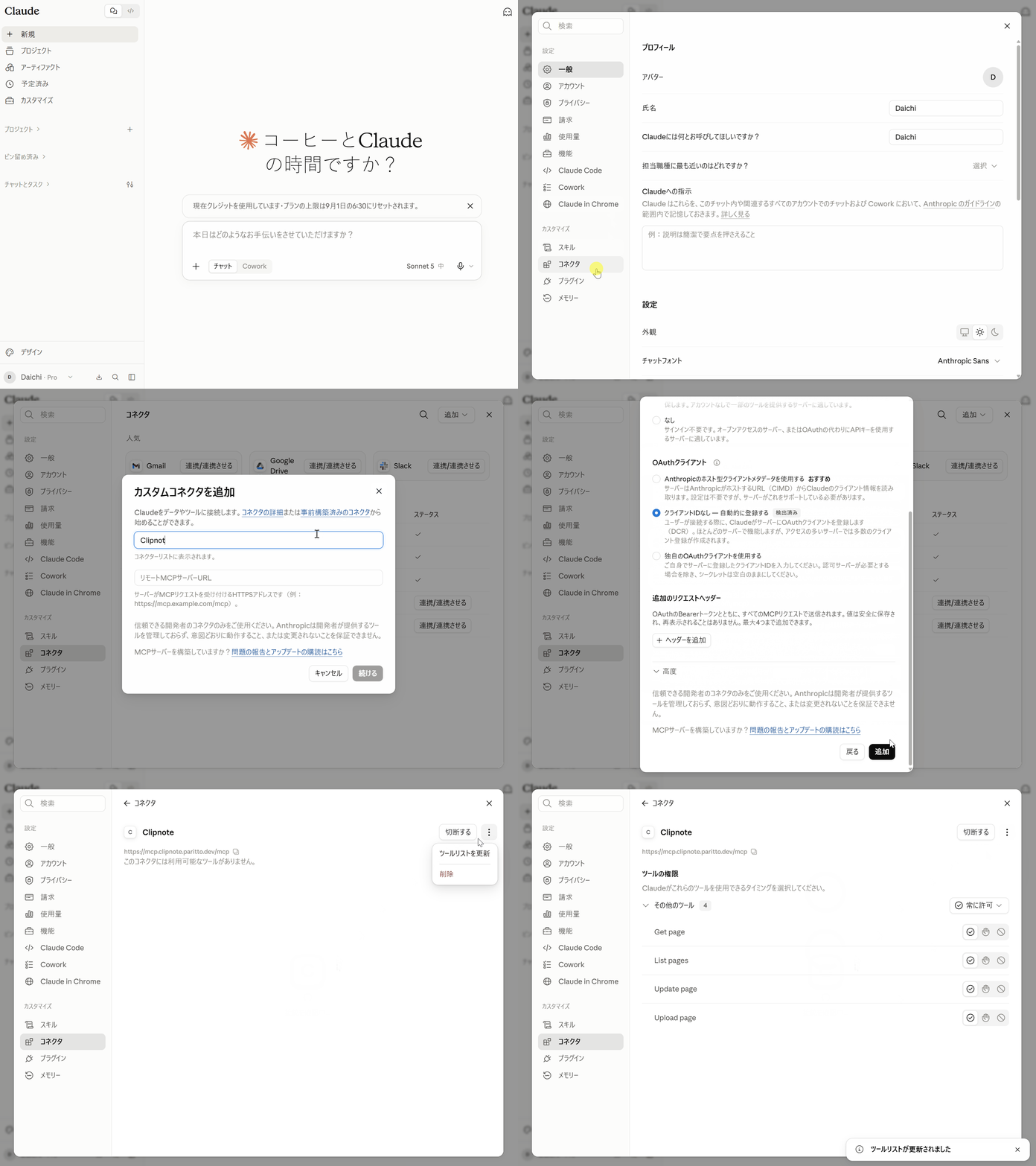
Connecting takes one click.
On claude.ai, just click a button and grant permission — no passwords or API keys needed. Once connected, just ask in the conversation to "save this" or "update it." No more copy-pasting.
- ✓Browse your clipsSearch and list your clips by title
- ✓Pull content into a replyFetches the body of a chosen clip and answers based on it
- ✓Save a new oneTurns the rest of the conversation straight into a clip
- ✓Update an existing oneUpdates an existing clip (the old version is saved automatically)
- ✓Save it with imagesCharts and figures your AI makes are saved embedded in the content
Supported AI & plans
- ClaudeFree–Enterprise (all plans)
Free is limited to 1 custom connector
- ChatGPTPlus / Pro / Business / Enterprise / Edu
Turn on "Developer mode" in settings to connect (web only)
Supported formats
Plain text, Markdown, and HTML — pick whichever fits your content.
Kyoto next week — day one is a walk from Kyoto Station to Higashi Honganji and Nishiki Market for lunch on the go. In the afternoon, head to Fushimi Inari and climb the torii gates as far up as we can manage.
Just line breaks and words. No formatting needed — keep it as a plain note.
Good for
- Saving conversation logs
- Quick, unstructured notes
- Drafts and brainstorming
Reading notes: “Let Ideas Sit”
- ✓Take notes the moment a book catches my interest
- Let it rest, then come back and reread
Headings, lists, tables, and quotes let you keep information structured.
Good for
- Meeting notes & summaries
- Comparison tables & checklists
- How-to guides with screenshots
BIRTHDAY PARTY
Birthday party invite
Sat, Sep 12, 18:00 — at our place
Layout, styling, even interactivity — reproduce exactly what your AI designed.
Good for
- Reports & documents with charts
- Event announcement pages
- Elaborately designed pieces
For example — clips like these.
Weekly sync notes — Aug 29
Decisions
- • New landing page outline approved
- • Asset shoot moved to next week
- • Dashboard section will use dummy data
Action items
Take the dashboard screenshots (me)
Prepare the GIF for the MCP section
Review the landing page build before the next sync
Next meeting
Fri, Sep 5, 10:00 — online
Chicken and egg rice bowl, riffed (serves 3)
Ingredients
- • Chicken thigh, 200 g
- • Onion, 1/2
- • Eggs, 3
- • Dashi 100 ml / soy sauce 2 tbsp / mirin 2 tbsp
- • Mitsuba (optional)
Method
- 1. Slice the onion thinly
- 2. Bring the dashi, soy sauce and mirin to a simmer
- 3. Add the chicken and onion, cook 5 minutes over medium heat
- 4. Pour in the beaten egg and pull it off the heat while still soft
- 5. Spoon over rice and scatter mitsuba on top
Notes on the tweak
Shimeji mushrooms stretch it further and add depth — two wins at once. A little chili powder works too.
PROPOSAL
Feature proposal page
To make references to existing clips more reliable, we propose the two changes below. Feedback keeps coming back to the same thing: a title that is slightly off means the clip can't be found.
Absorbing title variations
- • Search that tolerates partial and near matches
- • Surface recently updated clips as candidates first
Narrowing by collection
- • Support “look for it inside a named collection”
- • Use the collection description as a hint for search
Planned for the next release. One option is to ship #1 on its own first.
🎉 FAN MEETUP
Fan Meetup
Sun, Oct 4, 13:00 — Ikebukuro
✨ How the day goes
- 🕐 13:00 Doors open
- 🎁 13:30 Merch swap
- 💬 15:00 Share your favorites
- 👋 16:30 Wrap up
What to bring
Merch you'd like to swap, plus a keychain of your favorite as a name tag
RSVP →Switching phones: moving your data
Pasted in my own screenshots to write up the steps.
- 1. On your old phone, open Settings → Backup9:41
Settings
Wi-FiBackupNotifications - 2. Tap “Back up now” and wait for it to finish9:41
Backup
Back up now - 3. Scan the QR code shown on your new phone9:41
Scan with old phone
Takes about 30 minutes. Keep it charging while you go.
Update or add to that clip, right in place.
Saving isn't the finish line. Just mention it by name, and your AI will pull up that clip and answer or update it based on what's in there.
* The clip's content stays as-is (used to inform the reply)
Features
Image assets
Put images right in your content.
Upload screenshots and figures and embed them in Markdown or HTML clips. Charts your AI makes can be saved straight over MCP, too. PNG, JPEG, GIF, or WebP, up to 5 MB.

↓ Rendered
Collections
Bundle clips into one URL.
Group multiple clips into a collection and share them as a single public page.
Create & update clips manually
Pasting it in works too, of course.
No MCP connection? No problem — just copy and paste, or drag and drop a file, to save or update.
Version history
Overwrite it, and nothing's lost.
Every update automatically saves the previous version, so you can look back or restore it anytime.
Trash
Delete it, and get 30 days to change your mind.
Deleting doesn't erase it right away. Restore anything within 30 days, so tidying up stays low-risk.
Build a bill-splitting tool. Build a rock-paper-scissors game.
Beyond Markdown and plain text, Clipnote supports HTML too. Ask ChatGPT or Claude to "build a tool that splits a bill" or "build a rock-paper-scissors game," and you get working HTML on the spot. Instead of pasting it into a browser once and forgetting about it, save it to Clipnote and it's always one URL away — ready to open, ready to show anyone. Documents aren't the only things worth keeping — the small, useful, or just-plain-fun stuff deserves a home too.
Enter the total and how many people, and each share appears on the spot.
Pick a hand and actually play against the AI (well, a random number).